Accessory ecosystems
Curios is most useful when several mods need rings, charms, belts, amulets or other extra equipment concepts to coexist without separate inventory systems.
Curios Mod is a flexible accessory and equipment API used by compatible Minecraft mods to add and manage extra equipment slots. Check loader compatibility, match the correct Minecraft version, and follow a clean setup path before you install.

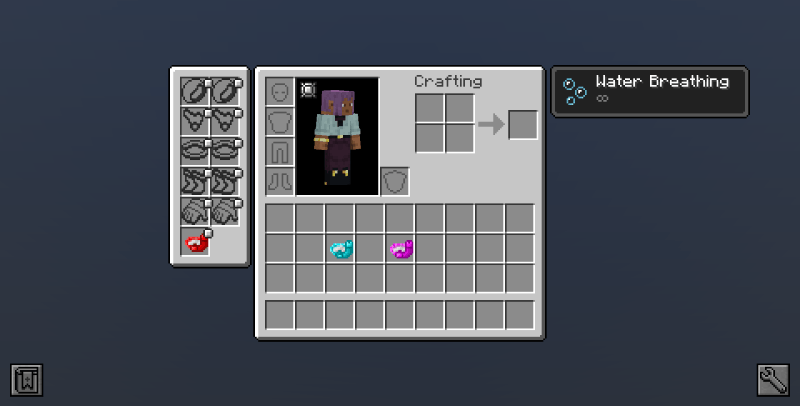
Instead of every Minecraft mod inventing an isolated equipment system, Curios gives compatible mods a shared API for registering and using accessory-style slots.
Think of Curios as the framework that helps different mods agree on where extra equipment belongs.
The value is in coordination: shared slot identifiers, integration points and a predictable way for compatible mods to expose equipment.
Mods can add accessory-style slots without replacing the vanilla armor inventory.
A shared API helps different mods target common slot definitions instead of competing systems.
Available controls depend on Curios and the mods that integrate with it, giving packs room to shape equipment behavior.
Loader error messages can identify missing or incompatible Curios versions required by other mods.
Most Curios problems are not about installation clicks; they are about mismatched versions. Use a four-point check before launching the game.
Identify the exact game version used by your profile or modpack.
Confirm whether the profile uses Forge, NeoForge, or another ecosystem.
Match Curios to the requirements listed by the mods that depend on it.
Back up important worlds, launch once, and read any loader error before adding more mods.
Curios is most useful when several mods need rings, charms, belts, amulets or other extra equipment concepts to coexist without separate inventory systems.
Some mods require Curios to load because their wearable items are built around its API.
Creators can standardize equipment behavior across multiple content mods.
Version and loader matching helps reduce startup errors when assembling a profile.
Dependency messages often reveal which Curios build another mod expects.
Do not choose a Curios file by Minecraft version alone. Loader family matters too.
The original Curios Fabric branch was discontinued after the 1.16.5 era. A search such as “Curios API Fabric 1.21.1” should not be treated as proof that a modern official Fabric build exists.
Before using the provided archive, confirm that it is the file you intend to download and that it matches your setup. Keep a backup of modded worlds and configs before replacing dependencies.
Download Curios mod
Mod files are executable game components. Prefer trusted project distribution channels, compare filenames and versions carefully, and scan unexpected archives. Never disable security software just to make an unknown file run.
Confirm the Minecraft version and mod loader before changing files.
Copy important worlds, configs and the current mods list.
Keep the correct Curios build in the profile’s mods folder and remove obsolete duplicates.
If the loader stops, use the dependency message rather than guessing another version.
Curios filenames typically reveal the loader family and target Minecraft version. Treat labels such as 1.20.1, 1.21.x, Forge and NeoForge as compatibility information—not interchangeable marketing names. If a dependent mod asks for a specific API range, follow that dependency requirement.
Curios mod 1.20.1 Curios mod Forge NeoForgeSee how slot registration fits into a compatible mod ecosystem.
Read guide →Use a version-specific compatibility checklist before installing.
Read guide →Translate dependency messages into practical fixes.
Read guide →Version, loader, setup and troubleshooting questions—organized for quick scanning.